Command-line interface
Drive sessions, scripting, and batch jobs from the shell so servers and CI can reuse the same transfer logic as the GUI.

Deep dive
WinSCP helps you inspect remote files, supervise transfers, fix permissions, keep large folders manageable, and extend workflows while staying natural on Windows. The checklist below gives short plain-language summaries of common capabilities.
Capability index
Drive sessions, scripting, and batch jobs from the shell so servers and CI can reuse the same transfer logic as the GUI.
Automate recurring uploads, downloads, and sync with WinSCP scripts and external schedulers instead of clicking through each run.
Pick Commander-style dual panes or an Explorer-like single tree so navigation matches how you think about hosts and folders.
Run from a USB stick or locked-down profile with configuration stored in files instead of relying on machine-specific registry keys.
Tunnel additional TCP ports through SSH so database or admin tools reach private subnets without a separate VPN client.
Open PuTTY for the same host, wire Pageant for keys, and use Explorer drag-and-drop plus custom external commands on selected paths.
Save sets of open sessions and layouts so you can restore a whole morning of tabs after a reboot or laptop swap.
Wrap stored site passwords behind one strong passphrase so a stolen settings file is not immediately usable.
Queue many files and let transfers finish in the background while you keep browsing, editing, or planning the next job.
Pick up large binary transfers after drops or pauses when the protocol supports resume, saving time on flaky links.
Encrypt or decrypt files as part of a workflow so payloads are protected at rest before they cross the network.
Choose binary integrity for archives and executables, or text mode when line endings must normalize between Windows and Unix.
Align modification times across servers and clients that disagree about precision, time zones, or daylight-saving edges.
Cache remote listings to scroll very large trees faster, refreshing when you need proof the server view is current.
Keep SFTP for files while issuing one-off shell commands through SSH when your host allows both channels on the same login.
Attach favorite tools to the UI with tokens for local and remote paths so editors, diff viewers, or scanners launch in one click.
Include or exclude filename patterns during sync, copy, or delete so bulk operations stay precise on messy directories.
Rename batches on transfer using masks for case, prefixes, extensions, or sequencing so remote trees stay consistent.
Scripted helpers for path joins, extensions, and transforms reduce brittle string hacking in automation.
Optional update notices remind you when a newer build exists; pair any upgrade with your own hash and policy checks.
Tune speed limits, parallel transfers, overwrite rules, and resume behavior for hosts that need gentler or more aggressive defaults.
Session and transfer logs support audits and post-mortems; XML-oriented logging helps tools parse outcomes automatically.
Decide whether settings live in the registry or flat files so gold images, roaming profiles, and backups behave predictably.
Let IT lock down parts of the UI or configuration surface so users get transfers without risky protocol or credential changes.
Quotes from public WinSCP user reviews; usernames are shown as published. One entry was shortened where the original included an unrelated link.
“Fantastic application. I'm using it already for years now, so it became time to support this through a donation. Which I did of course. Keep up the great work, thanks very much!”
“The best in its class! This project is a proof how hard is to get a review from users, 200k downloads per week and 200 reviews. What can I expect from my project with 50 downloads per week?”
“Using it since long time. Great job! Thanks!”
“Legendary software for HPC applications”
“Extraordinary development. Like it more than Filezilla.”
“The most useful scp client created ever.”
“This is a great product. Definitively I had donate a contribution by the life of the project and the people that works in that.”
“Perfect SFTP and SCP app. Unintrusive, small, lightweight, CPU-friendly, easy to use.”
“Very well thought-through piece of software.. The .NET integration is awesome, even includes a code template builder :)”
“Very useful and very easy to use despite my minimal level of experience”
“Good project”
“One of its kind.”
“I used WinSCP when I was working on Windows and it was kind of the best FTP client around. I work on iMac and unfortunately this software is not available for mac.”
“The support was really great. A lot of commercial software do less!”
“The best free FTP Client in the Universe”
“A fundamental tool for daily work”
“Thanks for product”
“I've been using this product for a long time, waiting for the interface update)”
“Great simplicity, just gets the job done, 5 stars!”
“Nice project using since last 5 years great tool”
“I've used WinSCP for about 20 years and it's helped me maintain MANY Linux Servers and Desktops. I recommend it to all levels of users.”
“The best Open Source file utility for managing data transfers, working from Windows into Linux. Martin has done a great job, from the very start, at the turn of the century.”
“Using it since long time. Great job! Thanks!”
“Fantastic application. I'm using it already for years now, so it became time to support this through a donation. Which I did of course. Keep up the great work, thanks very much!”
“The best in its class! This project is a proof how hard is to get a review from users, 200k downloads per week and 200 reviews. What can I expect from my project with 50 downloads per week?”
“Using it since long time. Great job! Thanks!”
“Legendary software for HPC applications”
“Extraordinary development. Like it more than Filezilla.”
“The most useful scp client created ever.”
“This is a great product. Definitively I had donate a contribution by the life of the project and the people that works in that.”
“Perfect SFTP and SCP app. Unintrusive, small, lightweight, CPU-friendly, easy to use.”
“Very well thought-through piece of software.. The .NET integration is awesome, even includes a code template builder :)”
“Very useful and very easy to use despite my minimal level of experience”
“Good project”
“One of its kind.”
“I used WinSCP when I was working on Windows and it was kind of the best FTP client around. I work on iMac and unfortunately this software is not available for mac.”
“The support was really great. A lot of commercial software do less!”
“The best free FTP Client in the Universe”
“A fundamental tool for daily work”
“Thanks for product”
“I've been using this product for a long time, waiting for the interface update)”
“Great simplicity, just gets the job done, 5 stars!”
“Nice project using since last 5 years great tool”
“I've used WinSCP for about 20 years and it's helped me maintain MANY Linux Servers and Desktops. I recommend it to all levels of users.”
“The best Open Source file utility for managing data transfers, working from Windows into Linux. Martin has done a great job, from the very start, at the turn of the century.”
“Using it since long time. Great job! Thanks!”
WinSCP treats remote trees as first-class workspaces: multi-select summaries, recursive size calculation triggers, and property sheets that expose path, ownership, and checksum workflows, not just blind upload/download buttons.
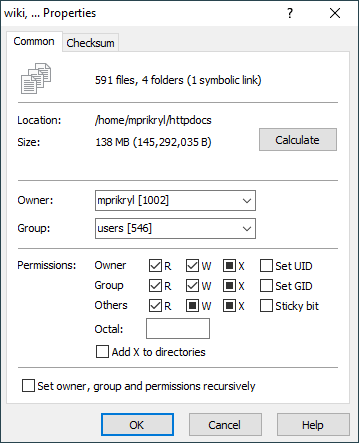
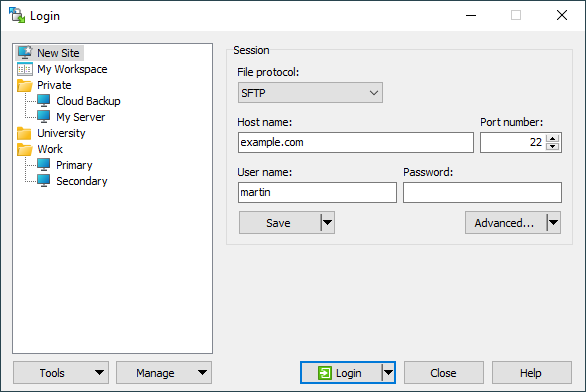
WinSCP gives you clear visibility into transfers and synchronization: checklist-driven reviews, background work for long deletes or sync jobs, and a session-oriented layout that stays readable during extended use.
The permissions surface is not an afterthought: matrix toggles for owner, group, and other, special UID, GID, and sticky handling, octal shortcuts, and recursive propagation. Use these controls when cleaning up deployment trees or hardening shared hosting directories.
Pair granular chmod workflows with service accounts that only see required subtrees.
Apply owner/group/mode recursively when remediating bulk uploads from Windows clients.
Document expected octal modes per environment and verify after each change window.
WinSCP is built to stay responsive when local folders are very large, when synchronization needs careful reconciliation, and when background processing should keep the interface usable. That stability matters when directories contain tens of thousands of objects.
Some reviews mention perceived speed limits or short idle timeouts. Combine WinSCP tuning with server-side ClientAliveInterval, load balancer idle policies, and realistic parallel transfer expectations. See guides on timeouts and throughput.
WinSCP’s power-user story is automation: batch-friendly scripting, a dedicated command-line interface, and a .NET assembly for composable operations. Windows integration spans PuTTY session alignment, custom commands, optional portable configuration files instead of registry footprints, and shell extensions for drag/drop ergonomics.
For automation detail beyond these pages, use your in-house technical library together with the automation and best practices guide.
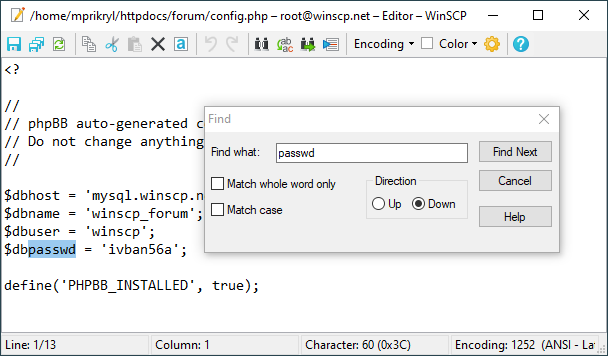
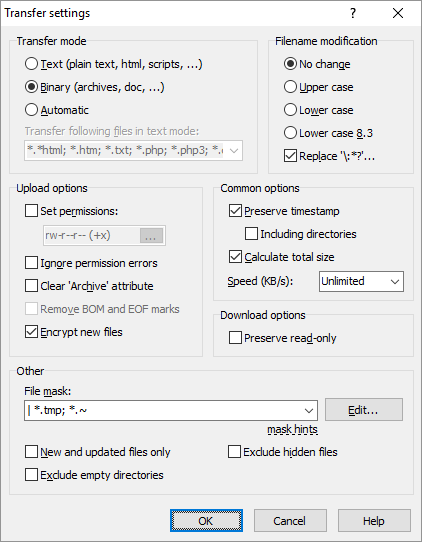
Translate feature knowledge into safe deployments: verify installers, read ethics statements, and follow troubleshooting recipes.