Interface
Dual productivity surfaces
Pick the orthodox Commander layout for side-by-side local/remote control or the Explorer-style remote pane with drag-and-drop from Windows File Explorer.

Secure transfers for Windows
Graphical client with Commander or Explorer layouts, deep session control, automation, and open-source transparency under the GNU GPL v2. Built for developers, administrators, and power users who need dependable remote file workflows.
WinSCP.app helps you evaluate WinSCP with clear download and integrity guidance on this site. See Trust & Security and integrity checks.
Mature Windows client
Actively maintained
WinSCP receives ongoing maintenance and improvements for Windows. Use a download channel you trust, keep a record of the exact build you deploy, and match any integrity checks to that same file.
Start here
The quick read before screenshots, downloads, or deep guides.
WinSCP (Windows Secure Copy) is a free, open-source file manager for Windows that specializes in secure transfers between your PC and remote servers. It supports the protocols teams deploy in production: SFTP and SCP over SSH, FTPS and legacy FTP when required, WebDAV for cloud endpoints, and Amazon S3 for object storage. It stays approachable for interactive work and strong enough for scripted automation.
Protocols you will see in production
Interface
Pick the orthodox Commander layout for side-by-side local/remote control or the Explorer-style remote pane with drag-and-drop from Windows File Explorer.
Day-to-day
Rename, chmod, recursive permission changes, synchronization modes, integrated editing, and external editor hooks streamline day-to-day site reliability work.
Scale
Batch scripting, a dedicated command-line interface, and a .NET assembly surface help you turn repetitive push/pull jobs into reliable pipelines.
Interface tour
Real interface captures from this site's media library. Tap or click an image to open a full-size preview.
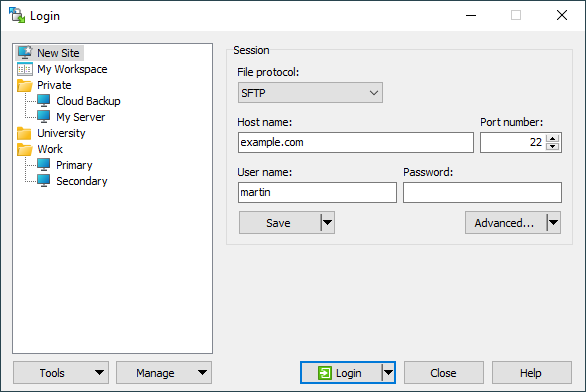
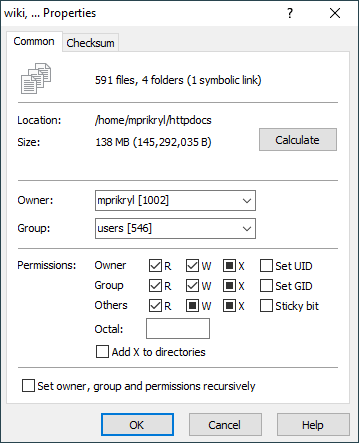
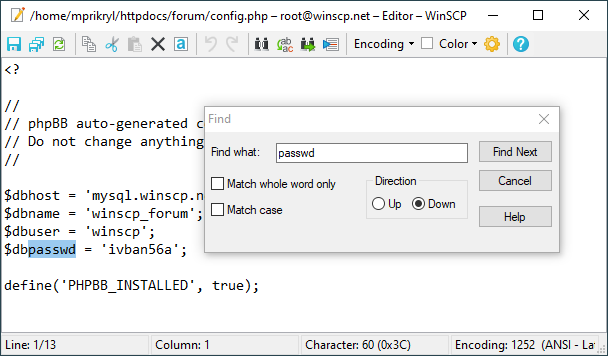
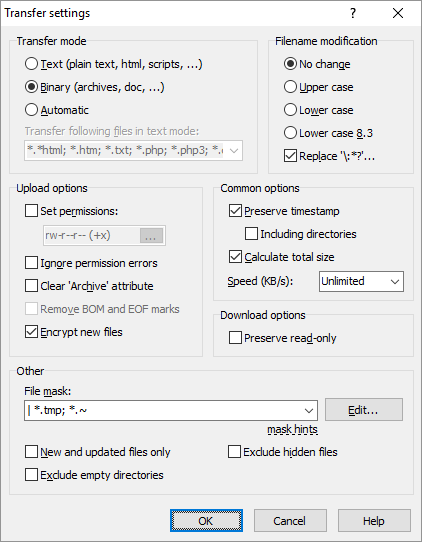
Quotes from public WinSCP user reviews; usernames are shown as published. One entry was shortened where the original included an unrelated link.
“Fantastic application. I'm using it already for years now, so it became time to support this through a donation. Which I did of course. Keep up the great work, thanks very much!”
“The best in its class! This project is a proof how hard is to get a review from users, 200k downloads per week and 200 reviews. What can I expect from my project with 50 downloads per week?”
“Using it since long time. Great job! Thanks!”
“Legendary software for HPC applications”
“Extraordinary development. Like it more than Filezilla.”
“The most useful scp client created ever.”
“This is a great product. Definitively I had donate a contribution by the life of the project and the people that works in that.”
“Perfect SFTP and SCP app. Unintrusive, small, lightweight, CPU-friendly, easy to use.”
“Very well thought-through piece of software.. The .NET integration is awesome, even includes a code template builder :)”
“Very useful and very easy to use despite my minimal level of experience”
“Good project”
“One of its kind.”
“I used WinSCP when I was working on Windows and it was kind of the best FTP client around. I work on iMac and unfortunately this software is not available for mac.”
“The support was really great. A lot of commercial software do less!”
“The best free FTP Client in the Universe”
“A fundamental tool for daily work”
“Thanks for product”
“I've been using this product for a long time, waiting for the interface update)”
“Great simplicity, just gets the job done, 5 stars!”
“Nice project using since last 5 years great tool”
“I've used WinSCP for about 20 years and it's helped me maintain MANY Linux Servers and Desktops. I recommend it to all levels of users.”
“The best Open Source file utility for managing data transfers, working from Windows into Linux. Martin has done a great job, from the very start, at the turn of the century.”
“Using it since long time. Great job! Thanks!”
“Fantastic application. I'm using it already for years now, so it became time to support this through a donation. Which I did of course. Keep up the great work, thanks very much!”
“The best in its class! This project is a proof how hard is to get a review from users, 200k downloads per week and 200 reviews. What can I expect from my project with 50 downloads per week?”
“Using it since long time. Great job! Thanks!”
“Legendary software for HPC applications”
“Extraordinary development. Like it more than Filezilla.”
“The most useful scp client created ever.”
“This is a great product. Definitively I had donate a contribution by the life of the project and the people that works in that.”
“Perfect SFTP and SCP app. Unintrusive, small, lightweight, CPU-friendly, easy to use.”
“Very well thought-through piece of software.. The .NET integration is awesome, even includes a code template builder :)”
“Very useful and very easy to use despite my minimal level of experience”
“Good project”
“One of its kind.”
“I used WinSCP when I was working on Windows and it was kind of the best FTP client around. I work on iMac and unfortunately this software is not available for mac.”
“The support was really great. A lot of commercial software do less!”
“The best free FTP Client in the Universe”
“A fundamental tool for daily work”
“Thanks for product”
“I've been using this product for a long time, waiting for the interface update)”
“Great simplicity, just gets the job done, 5 stars!”
“Nice project using since last 5 years great tool”
“I've used WinSCP for about 20 years and it's helped me maintain MANY Linux Servers and Desktops. I recommend it to all levels of users.”
“The best Open Source file utility for managing data transfers, working from Windows into Linux. Martin has done a great job, from the very start, at the turn of the century.”
“Using it since long time. Great job! Thanks!”
Capability map
Four pillars that cover most teams. Open any card for the deep dive on the features page.
Rich property dialogs, checksum tooling, and precise metadata views for folders and multi-selections.
Open section →
02Queues, background operations, and semi- or fully-automated directory sync patterns.
Open section →
03Owner, group, Unix matrix, special bits, octal entry, and recursive application for entire trees.
Open section →
04PuTTY alignment, custom commands, portable configuration, and extension points for power workflows.
Open section →
Who it is for
Three common profiles. Each card is a lens, not a job title limit.
Ship artifacts to staging, hot-fix configs over SFTP, diff-friendly editing with external tools, and repeatable scripted deploy steps.
Bulk permission repair, WebDAV bridges (including evolving OneDrive interfaces), S3 tagging workflows, and resilient sync checklists.
Commander power layout, keyboard-driven transfers, portable USB-based toolkits, and tight Windows shell integration.
Decision support
WinSCP competes with other respected Windows clients such as FileZilla, Cyberduck, and MobaXterm. Use this matrix as a starting point. Your protocol mix, UI preference, and automation model should drive the final choice.
| Capability axis | WinSCP | FileZilla | Cyberduck |
|---|---|---|---|
| Primary focus | Deep Windows integration, dual-layout mastery, scripting & .NET automation | Broad FTP/SFTP usage, cross-platform client | Multi-cloud browsing with polished macOS heritage |
| Protocol breadth | SFTP, SCP, FTP/FTPS, WebDAV, S3, local-to-local | FTP/SFTP and related transfer modes | Wide storage connector catalog via architecture |
| Licensing posture | GNU GPL v2 open source | GPL (FileZilla Client) | GPL v3 |
| Windows-native ergonomics | Explorer + Commander paradigms, shell extensions, portable mode | Mature but different UI conventions | Cross-platform UX patterns |
WinSCP has a long track record and supports integrity checks suited to enterprise rollout. Prefer the download sources your security team approves, validate hashes when you have them, and read Trust & Security before regulated deployments.
FAQ picks
Short cuts to common questions. The dedicated FAQ page has the full set.
Heuristic scanners sometimes flag legitimate network tools. Compare hashes to the values your security team publishes, download only from approved locations, and read antivirus guidance.
Yes, alongside SFTP/SCP and FTP family protocols, enabling hybrid workflows across object storage and traditional servers.
Scripting, CLI operations, and the .NET assembly interface support scheduled and repeatable jobs beyond manual UI transfers.